
Self-paced course · Beginner
Build a macOS app with Cursor
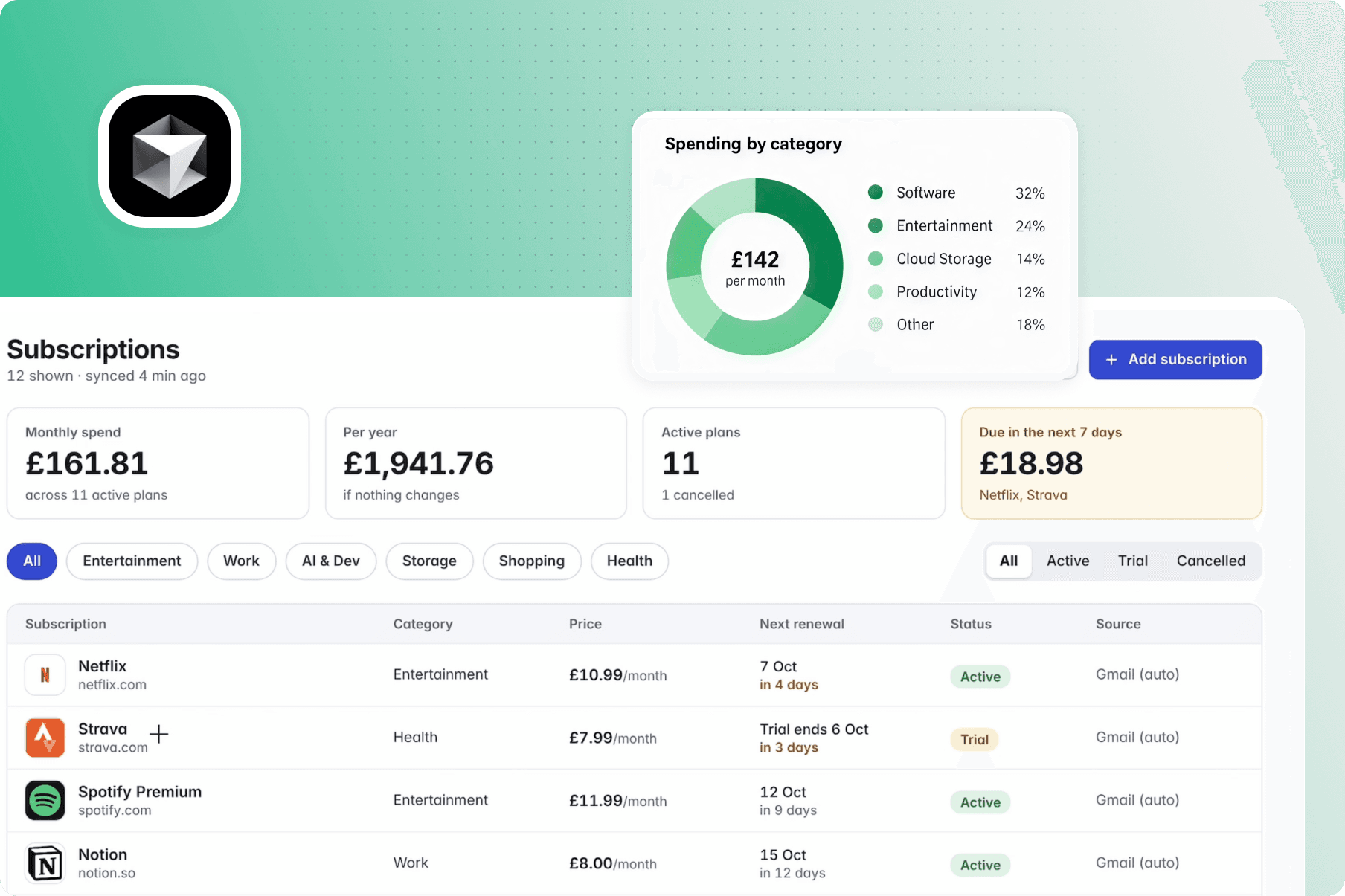
Design and build Recur, a desktop app for tracking subscriptions. Use Cursor, Xcode, SwiftUI and SwiftData to develop the app, add payments and licensing, and connect bank accounts.
 New
- Launch date
- 15 October 2026
- Lessons
- 17
- Difficulty
- Beginner
- Duration
- 2 hr 32 min
- Last updated
What you’ll learn.
- Build a native macOS app with Cursor, Xcode and SwiftUI
- Store your app's data with SwiftData
- Generate app designs and create a development plan
- Organise development into clear milestones
- Test CSV imports and refine app details
- Add payments and licensing
- Test payment flows with Stripe
- Connect bank accounts to the app
- Plan for Apple notarisation
One lesson at a time.
Your course curriculum.
3 sections · 17 lessons · 2 hr 32 min total
01Getting started with Recur3 lessons
- A forenote
- A look at Recur subscription tracker
- The tools we’re usingWatch sample
02Design and build the app7 lessons
- Generating the app designs
- Creating our build plan
- Milestone 0: Connect GitHub and set up the project
- Milestones 1 and 2: App shell, local data and subscription list
- Milestone 3: Renewal reminders and the app icon
- Milestones 4 and 5: Spending insights and bank CSV import
- Add company logos and test bank CSVs
03Payments, bank connections, and release planning7 lessons
- Adapting the plan
- Milestone 6: Sell Recur with Stripe and licence keys
- Payment testing with Stripe
- Planning for Apple notarisation
- Guide: Sign, notarise and update Recur with Sparkle
- Syncing our bank accounts
- Congratulations
The tools you’ll use.
SwiftUI
Apple's framework for building app interfaces in Swift, using declarative code that works across Apple platforms.
Cursor
An AI-powered code editor that enhances developer productivity with smart suggestions and automation tools.
SwiftData
Apple's framework for storing and querying your app's data using plain Swift code.

Cloudflare
A cloud platform for building, deploying, and securing applications, with services for compute, storage, and networking.
Resend
A modern email API service that simplifies sending transactional emails with powerful delivery infrastructure and analytics.
Stripe
A comprehensive payment infrastructure platform that enables businesses to accept payments and manage financial transactions securely online.
Xcode
Apple's development app for building, running, debugging, and shipping apps for Mac, iPhone, iPad, and other Apple platforms.

Era
A financial platform that connects accounts, documents, and AI agents to help manage money and automate financial tasks.


The project.
About this course.
Learn to build Recur, a native macOS subscription tracker, step by step with Cursor. You'll build the interface with SwiftUI, store your data with SwiftData, and build and run the app in Xcode. The project takes you from initial designs and a development plan through to working features, payments, and bank connections, using tools including Stripe, Era, Cloudflare, and Resend. Start by exploring Recur and the tools behind it, then generate app designs and break the build into manageable milestones. Create the app shell, work through each stage of development, refine the logos, and test CSV imports. Along the way, you'll learn how to adapt your plan as the project evolves. Next, add payments and licensing, test payment flows with Stripe, and connect bank accounts. You'll also plan for Apple notarisation and understand the next steps towards distributing a macOS app. By following the project from design to testing, you'll develop a practical workflow you can apply to your own desktop app ideas.
Before you start.
What will I learn in this course?
Build a native macOS app with Cursor, Xcode and SwiftUI. Store your app's data with SwiftData. Generate app designs and create a development plan. Organise development into clear milestones. Test CSV imports and refine app details. Add payments and licensing. Test payment flows with Stripe. Connect bank accounts to the app. Plan for Apple notarisation
Is this course right for my experience?
This course is listed as beginner. Review the curriculum and tools above to see what the project covers. Watch a free sample to check the pace before buying.
How is the course taught?
The course is self-paced, with 17 lessons across 3 sections. Pause, replay, and build alongside the videos. Allow extra time to work through the project yourself.
Are the tools included in the course price?
The course price covers the lessons. Tools, API usage, hosting, or other services used in the project may have their own charges. Check the listed tools and their current plans before you start.
Where can I ask a question?
Use the Q&A section on the relevant lesson after signing in. Include what you tried and any error message so the conversation has the context it needs.

Your instructor.
Gregory John.
Founder of Buildcamp and instructor of project-based courses on web apps, mobile apps, and AI agents.
Meet your instructor ↗